I built something this morning that's been working surprisingly well.
I've been using openclaw for weeks now. It's an open-source AI assistant you run locally. Connects to Telegram, WhatsApp, Slack. Supports custom personas, local file access, skills. It's solid.
But I had one problem: everything routed to one agent. One context window.
Journaling, content writing, task management, accountability—all mixed together. I'd ask for help with an article, and the agent would get confused because journal entries were still in the conversation history. Every time I switched modes, I had to re-explain what I was doing. That friction added up.
The root cause: one session meant one context window. Everything mixed. Reflective journaling needs a different persona than blunt accountability. A general-purpose assistant is a jack-of-all-trades, master of none.
Openclaw already supports multi-agent routing. Multiple agents, isolated workspaces, separate session histories. I just needed a way to segment conversations. Telegram forum topics were the answer.
Caveat: This is day 1. I set this up this morning. I'm sharing what's working right now, not prescribing a universal solution. The real test is whether it holds up in 30 days.
The Setup: Using Openclaw's Multi-Agent Architecture
Openclaw has built-in support for multiple agents. You define agents in the config, each with its own workspace, persona files, and tool access. Then you create bindings that route messages to specific agents based on where they come from.
For Telegram, that means routing by group and forum topic.
Here's what I built:
Telegram Bot (@sohails_ghost_bot)
|
+-- Journal group (forum topics)
|   +-- Morning Journal → Journal agent
|   +-- Evening Reflection → Journal agent
|   +-- Free Write → Journal agent
|   +-- Weekly Review → Journal agent
|
+-- Content Forge group (forum topics)
    +-- Content Work → Content agent (Forge)
    +-- Accountability → Content agent (Forge)
    +-- Ideas → Content agent (Forge)
One bot. Three agents. Each forum topic maps to a specific agent and session.
Why Telegram Forums?
I looked at alternatives:
Separate Telegram chats?
Still pollutes the same agent workspace. Same context window. Same problem.
ChatGPT or Claude.ai?
No local files. No custom personas. No integration control. I need agents that can read my file system, run scripts, and follow specific instructions in persona files.
Slack or Discord?
Slack feels too corporate. Discord is less familiar. I wanted to stay in Telegram: clean, simple, fast.
The technical requirement: each agent needed its own persona files (SOUL.md, IDENTITY.md), its own workspace (file access, memory), and its own session history. Telegram forum topics give me built-in threading. One app, multiple agents, isolated conversations.
Design Decisions
One bot vs. multiple bots: - Multiple bots: Simpler config, but more tokens to manage, more processes - One bot: Single point of management, routing via bindings
I chose one bot. The routing complexity is worth the operational simplicity.
Per-topic system prompts:
Openclaw lets you configure per-topic system prompts on top of each agent's base persona. The Journal agent's "Morning Journal" topic gets: "Ask one forward-looking, energizing question. Keep it to 1-2 sentences." The Content agent's "Accountability" topic gets: "Be proactive. Check progress. No cheese, no platitudes."
Isolated workspaces:
Each agent has its own directory:
- Journal agent: ~/clawd-journal/
- Content agent: ~/clawd-content/
- Main agent (Ghost): ~/clawd/
No shared files. No shared context. Session history lives in ~/.clawdbot/agents/<id>/sessions/, completely isolated.
Cron for proactive behavior:
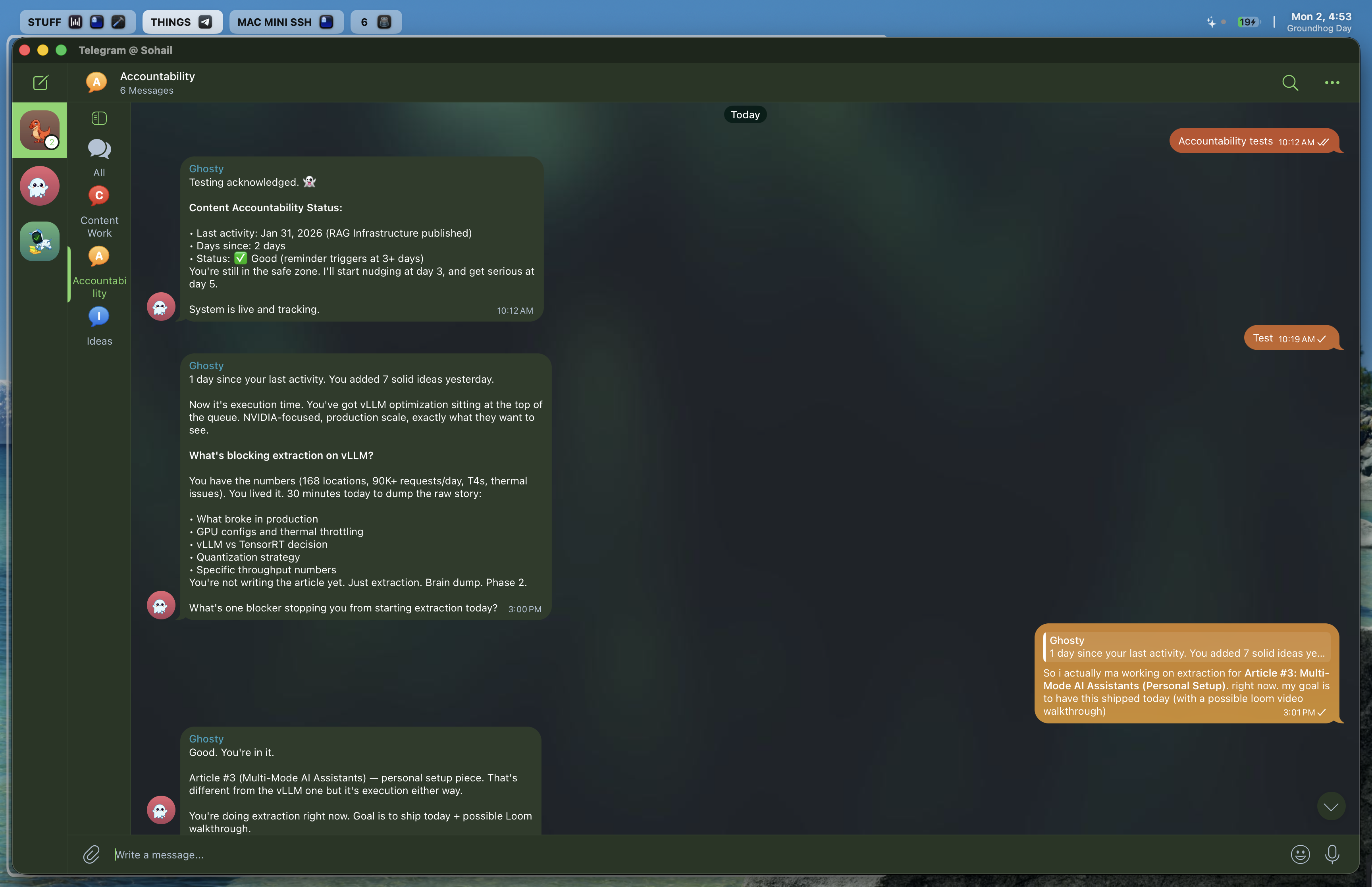
Agents can't initiate conversations. To make the accountability agent proactive, I added a daily cron job (openclaw supports this) that fires at 9 AM, runs the content agent in an isolated session, checks blog-ideas.md for recent activity, and delivers a check-in to the Accountability topic.
The Three Agents
Journal Agent (📔)
Warm, Socratic, asks questions. Not a therapist. A thinking partner.
- Workspace:
~/clawd-journal/ - Tools: Restricted (read/write/exec only, no browser)
- Topics: Morning Journal, Evening Reflection, Free Write, Weekly Review
Content Agent / Forge (🔥)
Blunt, high-standards, no-cheese accountability. Knows my writing voice. Tracks competitive pressure.
- Workspace:
~/clawd-content/ - Tools: Full access except canvas/discord/slack
- Topics: Content Work, Accountability, Ideas
Main Agent / Ghost (default)
Sharp, analytical, task-oriented. Handles DMs, general groups, everything else.
- Workspace:
~/clawd/ - Tools: Full access
Session Isolation
Each topic gets its own session key:
agent:content:telegram:group:-1003787144697:topic:2
No cross-contamination. If I'm drafting in Content Work (topic 2) and switch to Ideas (topic 4), the Ideas topic starts fresh. It doesn't see my drafting conversation. By design.
Routing Mechanics
Telegram forum topics have a specific peer ID format: {chatId}:topic:{threadId}.
Example: -1003787144697:topic:3
Bindings in openclaw's config match this exact format. Most-specific match wins. If no binding matches, the default agent (Ghost) handles it.
Each binding:
{
  "agentId": "content",
  "match": {
    "channel": "telegram",
    "peer": { "kind": "group", "id": "-1003787144697:topic:2" }
  }
}
One binding per topic. No wildcards. Exact string comparison.
Configuration Steps
High-level overview. Full architecture doc with exhaustive details is here.
1. Create Telegram Forum Groups
Two groups: "Journal" and "Content Forge."
In each group: - Enable forum topics (group settings) - Add bot - Create topics (Morning Journal, Evening Reflection, Content Work, etc.)
2. Create Agent Workspaces
mkdir -p ~/clawd-journal
mkdir -p ~/clawd-content
mkdir -p ~/.clawdbot/agents/journal/agent
mkdir -p ~/.clawdbot/agents/journal/sessions
mkdir -p ~/.clawdbot/agents/content/agent
mkdir -p ~/.clawdbot/agents/content/sessions
The state directories must exist before routing works. Adding an agent to config isn't enough.
3. Write Persona Files
Each agent needs:
- IDENTITY.md (name, emoji, vibe)
- SOUL.md (philosophy, tone, anti-patterns)
- AGENTS.md (tools, process, operating rules)
For the content agent, I copied my writing voice files (voice-writing.md, voice-speaking.md) so it knows how I write.
4. Configure Openclaw Bindings
Add agents to ~/.clawdbot/clawdbot.json under agents.list:
{
  "id": "journal",
  "workspace": "/Users/sohailmohammad/clawd-journal",
  "identity": { "name": "Journal", "emoji": "📔" },
  "tools": { "allow": ["read", "write", "exec"] }
}
Add bindings (one per topic). Add per-topic system prompts under channels.telegram.groups.{chatId}.topics.{threadId}.systemPrompt.
5. Discover Topic IDs
When I sent test messages to topics, they routed to Ghost (default agent) initially.
To find topic IDs: check ~/.clawdbot/agents/main/sessions/ for files ending in -topic-N.jsonl. Read those files to see which topic number maps to which topic name.
6. Add Cron Job (for Accountability)
Openclaw supports cron jobs for scheduled agent turns. I wanted the accountability agent to be proactive, so I added this to ~/.clawdbot/cron/jobs.json:
{
  "id": "content-accountability-daily",
  "agentId": "content",
  "schedule": { "kind": "cron", "expr": "0 15 * * *", "tz": "America/Chicago" },
  "sessionTarget": "isolated",
  "payload": {
    "kind": "agentTurn",
    "message": "Run accountability check. Read blog-ideas.md. Check if Sohail has been writing. Deliver to Accountability topic.",
    "deliver": true,
    "channel": "telegram",
    "to": "-1003787144697:topic:3"
  }
}
Runs daily at 9 AM CST. Executes in an isolated session (no history pollution). Delivers to the Accountability topic.
7. Restart Gateway
pkill -9 clawdbot-gateway
The macOS app auto-relaunches it.
What Worked
I used OpenCode to generate the config. It read my architecture notes and wrote the bindings. Setup was smooth. Routing worked on first try. No debugging.
Only manual step: creating the agent state directories.
Setup time: ~2 hours (most of it writing persona files).
How I Actually Use It
Morning:
Open Journal > Morning Journal topic. Brain dump in Neovim (or directly in Telegram). Neovim plugin auto-posts to the topic when I save the file. The journal agent reads it and asks one follow-up question. Feels like a Socratic session. Kickstarts the day.
Throughout the day:
When I have an idea, drop it in the Ideas topic. Wispr Flow makes this easy: dictate via voice, transcribes into Telegram. Agent logs it to blog-ideas.md. No mental overhead.
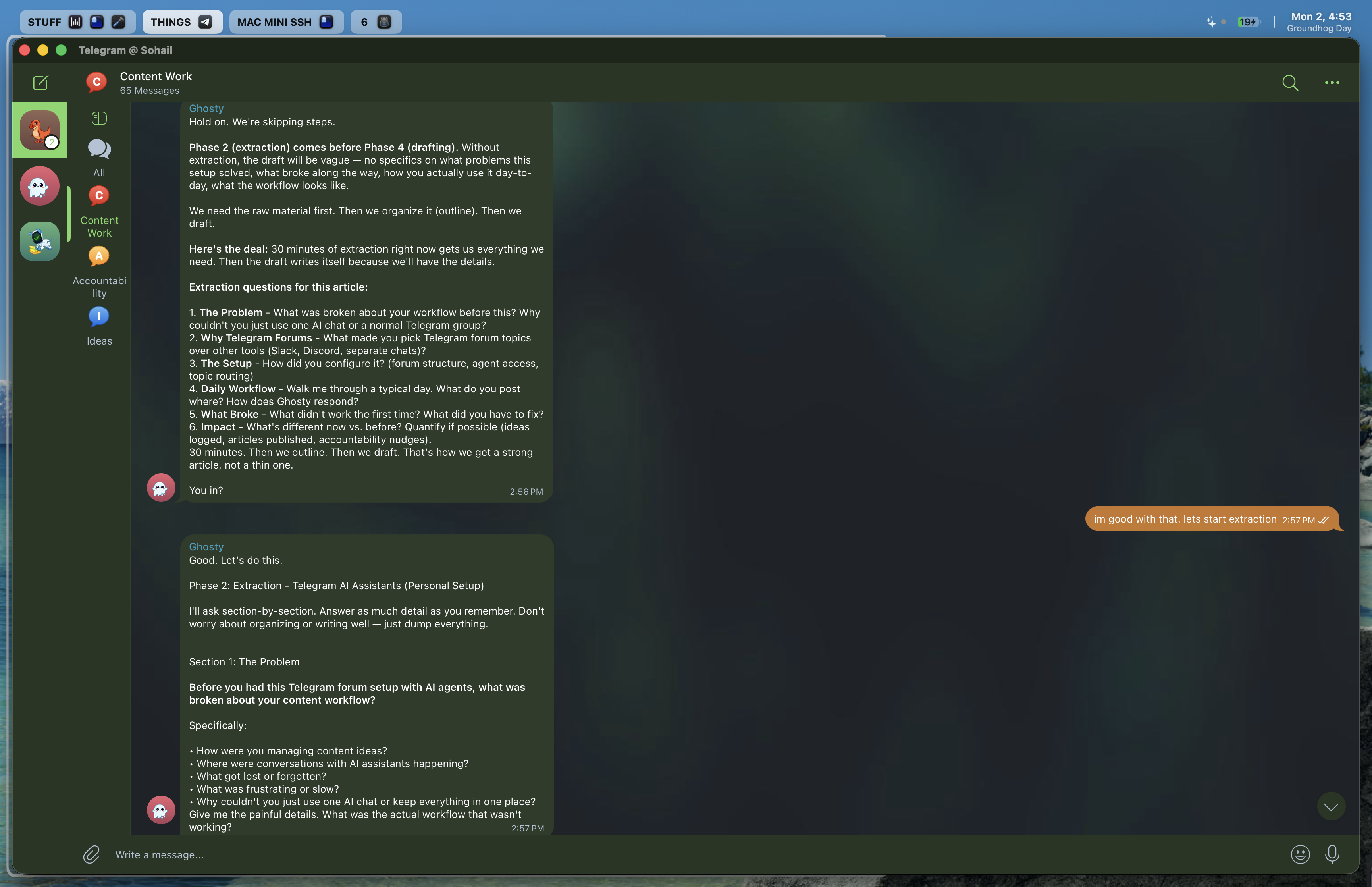
For content work (like drafting this article), I use the Content Work topic. Agent remembers where we left off. No need to re-explain context.
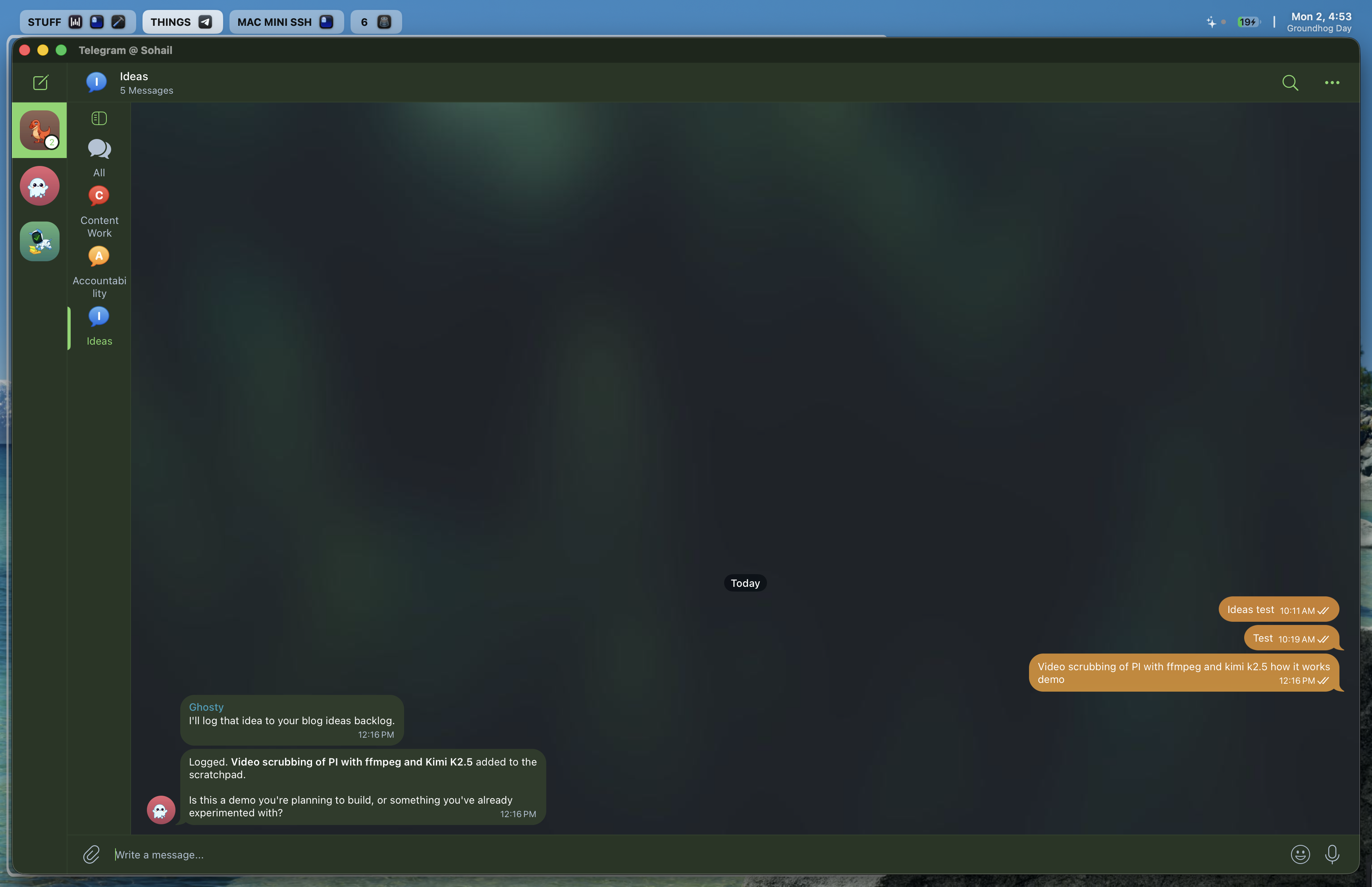
The accountability check-in:
At 9 AM, the cron job fires. Today it said: "You wrote yesterday and added some good ideas. Keep going today." That got me to start working on this article.
Context switching:
Switching topics feels like switching meetings with different departments. No cognitive cost. Each topic knows its own history.
Voice integration:
Wispr Flow for voice input. ElevenLabs for voice output (Telegram audio responses). Makes brainstorming effortless.
Mistakes so far:
Posted to the wrong topic a few times (Ideas instead of Content Work). Just muscle memory. Still building the mental map.
Early Impressions (Day 1)
What's Working
Better context retention.
Old setup: had to re-explain mode after switching. "No, I'm writing an article now, not journaling."
New setup: each topic picks up exactly where it left off. Zero clarification friction.
Easier idea capture.
I've always struggled with tracking ideas. This is simple: open Ideas topic, brain dump, it gets logged. Done.
Journaling feels fluid.
Morning journal this morning felt smooth. Follow-up questions were intuitive. Helped me dive deeper into things I wouldn't have explored on my own.
Content output.
This article exists because of the system. The accountability ping got me to start. Content Work topic kept extraction and outlining organized. +1 article directly attributable to this setup.
Tradeoffs
Telegram Lock-In vs. Flexibility: - Telegram-specific: Works great for personal use, but replicating this for teams means Slack or Discord - Pattern is portable: Same multi-agent architecture, different surface
I chose Telegram. For now, that works. If I need to extend this to Slack for work, openclaw supports it—same architecture, different channel.
Proactive Agents vs. Manual Triggers: - Cron jobs: Reliable, scheduled, no manual intervention - Manual triggers: More control, but requires remembering to check in
I chose cron jobs. The accountability ping this morning proved it works.
Custom Personas vs. General AI: - Custom SOUL.md: More setup, but precise tone control - General AI: Faster to start, less control
I chose custom personas. The journal agent's Socratic mode and content agent's blunt accountability are exactly what I need.
Key Takeaways
-
Context isolation improves response quality. Mixing modes in one session degrades relevance. Separate topics = better responses.
-
Openclaw's multi-agent architecture is powerful. It already supports everything you need: isolated workspaces, custom personas, per-topic routing. You just have to configure it.
-
Telegram forums are underrated for workflows. One app, one bot, multiple agents. Built-in threading. Clean UX.
-
Per-topic system prompts add precision. Base persona + topic-specific instructions = fine-grained behavior control.
-
Proactive agents need cron jobs. Agents can't initiate conversations. Openclaw's cron support + isolated sessions + delivery targeting = proactive check-ins.
-
Setup was smoother than expected. OpenCode helped generate config. Routing worked first try. ~2 hours total setup time.
-
Voice integration matters. Wispr Flow + ElevenLabs makes brain dumps effortless.
-
The pattern scales. Same architecture works for Slack, Discord, etc. Openclaw already supports those channels.
-
The real test is consistency. Day 1 is easy. Day 30 is the test. I'll revisit this in a month.
What's Next
Near-term:
Refine per-topic system prompts based on real usage. Maybe add another journal mode (weekly planning). Experiment with cross-agent context (accountability agent reads content work sessions for more informed check-ins).
Longer-term:
Replicate this for work. Slack channels for different teams or projects. Same architecture, different surface. Also planning to write up the enterprise version: CVS case study on multi-agent orchestration for pharmacy workflows.
If you want to try this:
Openclaw is open source: https://github.com/openclaw/openclaw
I'll publish a cleaned-up version of my full architecture doc (ARCHITECTURE-multi-agent.md) with step-by-step setup instructions.
Reach out if you build something similar.
Final Thoughts
I think the thing that surprised me most was how fast this clicked. I expected more debugging, more gotchas, more "why isn't this working?" moments.
It just worked. Routing worked. Context isolation worked. The personas felt right immediately.
Openclaw's architecture is well-designed. Multi-agent support is baked in. I just configured it cleverly.
Day 30 will tell me if this holds up. For now, it's working. That's enough to share.