I use X because I like to see what other people are posting, working on, building. Especially in AI/ML.
I live in Dallas. I'm not tapped into the Silicon Valley environment like people who live in SF or NYC. X is my signal. It's how I stay involved, how I interact with the broader tech world.
But here's the reality: Twitter's "For You" feed drops 100+ tweets a day. Some signal, lots of noise. And yes, it's still a dopamine source. I'm not quitting X. But sometimes I just want to know what's recent, what's happening, without scrolling for 30 minutes.
The options aren't great: - Scroll manually: Time sink, easy to miss things, dopamine trap - Turn off Twitter: Miss genuine insights, lose connection to the ecosystem - Build filters: Hard to get right, still requires active scrolling
What I wanted: automated triage. Fetch everything, surface what matters, deliver a digest I can read in 5 minutes. Personalized (because it's from my own For You page). With community sentiment analysis (because I already read replies manually—this just automates it).
So I built it.
What I Built
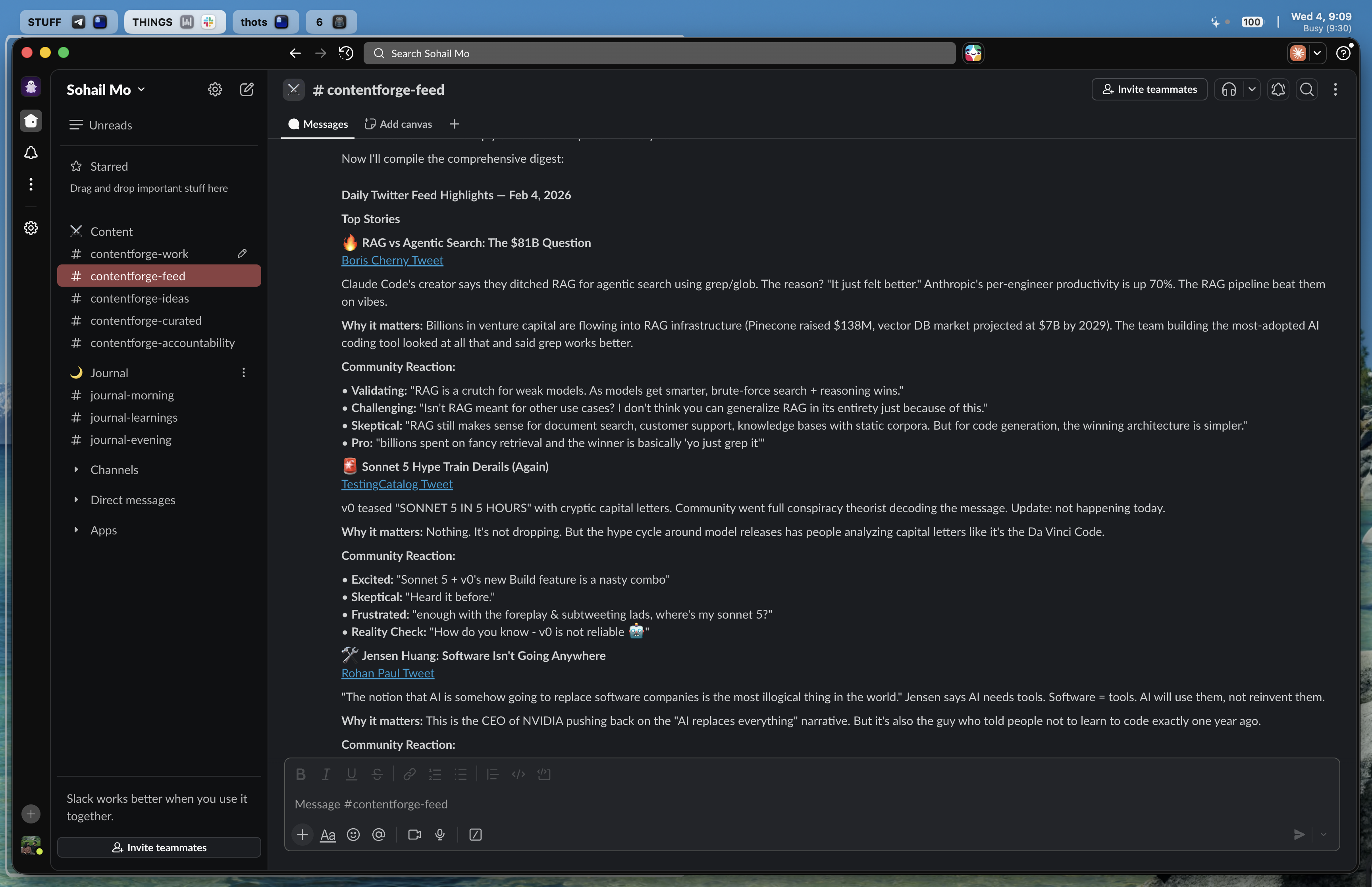
Automated feed scraper that: - Fetches 100 tweets from my "For You" timeline daily at 6 PM - Analyzes them with Claude (via OpenClaw) - Triages to 10-15 significant items - Fetches community replies to assess sentiment - Delivers a formatted digest to Slack
Built with Bird CLI (cookie-based X scraper) + OpenClaw (multi-agent bot framework) + Claude.
High-level flow:
Cron Job → OpenClaw Agent → Bird CLI (fetch tweets) → Claude (analyze) → Slack
Scheduled task triggers agent → agent runs Bird CLI to fetch timeline → saves raw JSON → analyzes with Claude → fetches replies for top tweets → formats digest → delivers to Slack.
The Components
Bird CLI: Cookie-Based X Scraping
Bird is a fast X/Twitter CLI tool that uses X's internal GraphQL API—the same endpoints the web app uses. It uses cookie-based authentication, which means no $100+/month API fees.
Why I chose it: - Official X API costs $100+/month for basic access - Bird uses your browser cookies → free - Fast, reliable, well-maintained
How it works:
- Extracts auth_token and ct0 cookies from your browser
- Calls X GraphQL endpoints directly
- Returns JSON
Key commands I use:
bird home --json --count 100  # Fetch timeline
bird replies <tweet-id> --json  # Fetch replies to a specific tweet
Installation:
npm install -g @anthropics/bird
Test it:
bird home --json --count 10
If it works, you'll see JSON output with tweet objects (id, text, author, engagement metrics).
OpenClaw: Multi-Agent Bot Framework
OpenClaw is a personal AI assistant framework I use for managing multiple agents across different channels. I wrote about my multi-agent setup with OpenClaw in a previous article.
Why I chose it for this:
- Already using it for my content workflow
- Built-in cron job support
- Agents can run shell commands (like bird)
- OAuth through Claude Pro subscription (no API key billing)
How it works in this setup:
- Cron job triggers the agent in an isolated session
- Agent runs bird home --json to fetch tweets
- Agent analyzes output with Claude
- Agent delivers formatted digest to Slack
If you don't have OpenClaw, you can replace it with a Python script. Same flow, different tools. I'll explain that later.
Learn more: OpenClaw on GitHub
Cron Job: Scheduled Execution
The job runs daily at 6 PM CST. It's configured in ~/.openclaw/cron/jobs.json:
{
  "id": "feed-highlights-slack",
  "agentId": "content",
  "schedule": {
    "kind": "cron",
    "expr": "0 18 * * *",
    "tz": "America/Chicago"
  },
  "sessionTarget": "isolated",
  "payload": {
    "kind": "agentTurn",
    "message": "<PROMPT>",
    "deliver": true,
    "channel": "slack",
    "to": "<CHANNEL_ID>"
  }
}
Key fields:
- agentId: Which agent handles this ("content" in my case)
- schedule.expr: Cron expression ("0 18 * * *" = 6 PM daily)
- sessionTarget: "isolated": Runs in a fresh session, doesn't pollute main conversation
- payload.deliver: true: Sends output to a channel
- payload.channel: Target platform ("slack")
- payload.to: Channel ID to deliver to
The Prompt: Triage + Sentiment Analysis
The prompt is where the magic happens. It's split into two phases:
Phase 1: Triage - Analyze all 100 tweets - Identify the 10-15 most significant items - Prioritize: AI/ML breakthroughs, software engineering insights, controversial takes, new releases, industry shifts - Note 5-10 honorable mentions (things worth a quick glance but not deep analysis)
Phase 2: Sentiment Analysis - For each of the 10-15 top tweets, fetch community replies - Extract 2-4 quote snippets from replies - Categorize reactions based on context: - For controversial takes: Pro / Against - For technical content: Validating / Challenging / Additional Resources - For announcements: Excited / Skeptical / Concerns
Voice & Tone (from the prompt):
Blunt, direct, no-nonsense. Zero sycophancy or hype. Don't oversell. A small insight is a small insight—say so. A big deal is a big deal—say so. Avoid "this changes everything" or "this is huge" unless it genuinely is. No "this, not that" style writing. Just state what it is. Let the signal speak for itself.
I told Claude to be honest about scale. If something's a small nugget, say it's a small nugget. If it's a big deal, say it's a big deal. No artificial hype.
The full prompt is ~300 words. I won't paste the whole thing here, but the pattern is: triage → sentiment analysis → format digest.
Slack Integration: Delivery
OpenClaw delivers the digest to a dedicated Slack channel. Configuration in ~/.openclaw/openclaw.json:
{
  "channels": {
    "slack": {
      "mode": "socket",
      "enabled": true,
      "channels": {
        "<CHANNEL_ID>": {
          "requireMention": false,
          "systemPrompt": "Twitter feed digest mode..."
        }
      }
    }
  }
}
Key settings:
- mode: "socket": Uses Slack Socket Mode (no public URL needed)
- requireMention: false: Bot responds without @mention in this channel
- Agent bindings route this channel to the "content" agent
Why Slack: - Already using it for content workflow - Clean formatting (code blocks, links, quotes) - Threaded discussions if I want to dig deeper - Persistent archive
The Setup
Here's how to replicate this.
Step 1: Install Bird CLI
npm install -g @anthropics/bird
Test it:
bird home --json --count 10
If it works, you'll see JSON output. If not, Bird might need browser cookies. Make sure you're logged into X in your default browser.
Step 2: Configure OpenClaw Agent
If you're using OpenClaw, create or use an existing agent with:
- Workspace: ~/assistant/data/feed/ (for saving raw JSON)
- Tools: exec (to run bird commands)
- Model: Claude Sonnet 4.5
If you're not using OpenClaw, skip this. You'll write a custom script instead (see "OpenClaw vs Custom Script" below).
Step 3: Create Cron Job
Add this to ~/.openclaw/cron/jobs.json:
{
  "id": "feed-highlights-slack",
  "agentId": "content",
  "schedule": {
    "kind": "cron",
    "expr": "0 18 * * *",
    "tz": "America/Chicago"
  },
  "sessionTarget": "isolated",
  "wakeMode": "now",
  "payload": {
    "kind": "agentTurn",
    "message": "Run `bird home --json --count 100` to fetch your Twitter For You timeline. Save the raw JSON to ~/data/feed/$(date +%Y-%m-%d).json for reference. Phase 1: Triage - Analyze all 100 tweets. Identify the 10-15 most significant items worth deeper analysis. Prioritize: AI/ML breakthroughs, software engineering insights, controversial or contrarian takes, new releases, industry shifts, anything genuinely interesting. Also note 5-10 honorable mentions worth a quick glance. Phase 2: Reply Sentiment Analysis - For each of the 10-15 significant tweets, run `bird replies <tweet-id> --json` to fetch community reactions. Voice & Tone: Blunt, direct, no-nonsense. Zero sycophancy or hype. Don't oversell. A small insight is a small insight—say so. A big deal is a big deal—say so. Avoid 'this changes everything' or 'this is huge' unless it genuinely is. No 'this, not that' style writing. Just state what it is. Let the signal speak for itself. Output Format: Use a single emoji as a visual separator before each item. For each of the 10-15 significant items: 1. Title/Hook + link to tweet, 2. Core insight - what's actually being said, 3. Why it matters - concrete impact, not hype. Be specific: who does this affect? what changes?, 4. Community Reaction - include 2-4 actual quote snippets from replies as bullet points. Categorize intuitively based on topic context: For controversial takes: Pro / Against, For technical content: Validating / Challenging / Additional Resources, For announcements: Excited / Skeptical / Concerns. Honorable Mentions: At the end, include a section with 5-10 tweets that didn't make the top list but are still interesting. For each: one-line summary + link to tweet.",
    "deliver": true,
    "channel": "slack",
    "to": "<YOUR_SLACK_CHANNEL_ID>",
    "bestEffortDeliver": true
  }
}
Replace <YOUR_SLACK_CHANNEL_ID> with your actual channel ID.
Step 4: Configure Slack Channel
Add the channel to ~/.openclaw/openclaw.json:
{
  "channels": {
    "slack": {
      "channels": {
        "<YOUR_SLACK_CHANNEL_ID>": {
          "requireMention": false,
          "systemPrompt": "Twitter feed digest mode. You scrape the For You timeline and surface what matters. Be ruthlessly selective."
        }
      }
    }
  }
}
Bind the channel to your agent:
{
  "bindings": [
    {
      "agentId": "content",
      "match": {
        "channel": "slack",
        "peer": {
          "kind": "channel",
          "id": "<YOUR_SLACK_CHANNEL_ID>"
        }
      }
    }
  ]
}
Step 5: Restart Gateway + Test
Restart the OpenClaw gateway to load the new config:
pkill -9 -f openclaw-gateway
nohup pnpm openclaw gateway &
Force-run the job to test:
pnpm openclaw cron run --force feed-highlights-slack --timeout 300000
Check Slack for the digest. If it works, it'll run automatically at 6 PM daily.
What the Output Looks Like
Each digest has: - 10-15 significant tweets with full analysis - Community reaction quotes (2-4 per tweet) - 5-10 honorable mentions (one-liners + links)
Example item:
🔹 **GPT-5 Announcement Leaks**
https://x.com/openai/status/123456789

OpenAI internal memo suggests GPT-5 training complete, targeting Q2 release.

**Why it matters:** If real, competitive pressure on Claude intensifies.
Affects model selection decisions for production systems.

**Community Reaction:**
*Excited:*
- "Finally, been waiting for this since GPT-4 plateaued"
- "The benchmarks better be real this time"

*Skeptical:*
- "Remember when GPT-4.5 was 'imminent'? I'll believe it when I see it"
- "Leaks are marketing. Wake me up when there's an API."
The format is consistent. Easy to scan. Community quotes add context I'd miss if I just read the tweet itself.
Why This Approach
Cookie Auth vs Official API
Official X API: - $100+/month for basic access - Rate limits - Complex OAuth setup
Bird CLI (cookie auth): - Free (uses your existing logged-in session) - Fast, reliable - No rate limits beyond what the web app has
Tradeoff: If you clear cookies or log out, Bird stops working. Keep a logged-in X session in your default browser profile.
OAuth vs API Keys
OpenClaw uses OAuth through my Claude Pro subscription: - No per-token API billing - Usage counts against Claude Pro limits (5h/day) - Tokens auto-refresh via background service
Why this works: - Daily digest takes ~2-3 minutes of Claude usage - Well within Claude Pro limits - No separate API billing
If you don't have OpenClaw: Use the official Claude API with the anthropic Python SDK. Same prompt, different execution layer.
OpenClaw vs Custom Script
Why I used OpenClaw: - Already using it for other workflows (journaling, writing, accountability) - Built-in cron support - Built-in Slack integration - Session management handled
If you don't have OpenClaw:
Write a Python script with:
- subprocess to call bird CLI
- anthropic SDK to call Claude API
- slack_sdk to post to Slack
- cron or systemd timer for scheduling
Same flow, different tools. The pattern is: 1. Fetch tweets with Bird CLI 2. Analyze with Claude 3. Deliver to Slack 4. Schedule it
The code is just glue. The real value is the prompt.
Gotchas & Lessons Learned
Gateway caches config:
- Editing jobs.json doesn't take effect until gateway restart
- Always restart after config changes
Bird CLI needs fresh cookies: - Don't use incognito mode - Keep a logged-in X session in your default browser
Set timeout appropriately:
- Feed analysis with reply fetching takes 2-3 minutes
- Set --timeout 300000 (5 minutes) when force-running
Gateway rewrites jobs.json:
- After each run, the gateway updates the state field in jobs.json
- Edit config → Restart gateway → Run job (in that order)
Is It Worth It?
What works: - I actually read the digest (5 minutes vs 30+ minutes scrolling) - Community sentiment quotes add context I'd miss otherwise—I was already reading replies manually, this just surfaces them automatically - Catches things I wouldn't have seen manually - Keeps me connected to the AI/ML ecosystem without being glued to X
What doesn't: - Still misses some nuance (threading, quote tweets) - Sentiment analysis is good but not perfect - Occasionally surfaces stuff that's not relevant to me - Doesn't replace X (I still use it for dopamine, let's be honest)
Would I build it again?
Yes. The time savings alone justify it. But I'd iterate on the prompt (more specific filtering). And I'd add a "mark as read" feedback loop so Claude learns what I care about.
Why I wrote this:
I wanted to make it super easy for others to replicate. If I'd had this guide when I started, it would have saved me hours of trial and error.
I know other people struggle with the same problem: wanting to stay connected without drowning in the feed. This is my way of staying involved in the AI/ML world from Dallas, not Silicon Valley. Maybe it helps you stay involved from wherever you are.
Final Thoughts
This is a simple automation that saves me real time. Bird CLI + Claude + OpenClaw = automated feed curation. If you're drowning in Twitter, try it. If you don't have OpenClaw, replace it with a Python script. Same flow, different tools.
The code is just glue. The real value is the prompt. Triage → sentiment analysis → digest. That's the pattern.
I built this because I needed it. I'm sharing it because I think you might need it too. If you build something similar, let me know. I'm curious what other people do for feed curation.